
News
Windows 11 Tests 48 kHz Bluetooth Stereo While Your Microphone Is On
Experimental build 26340.10032 raises audio playback quality for compatible LE Audio gear, but isn’t a general Windows update.
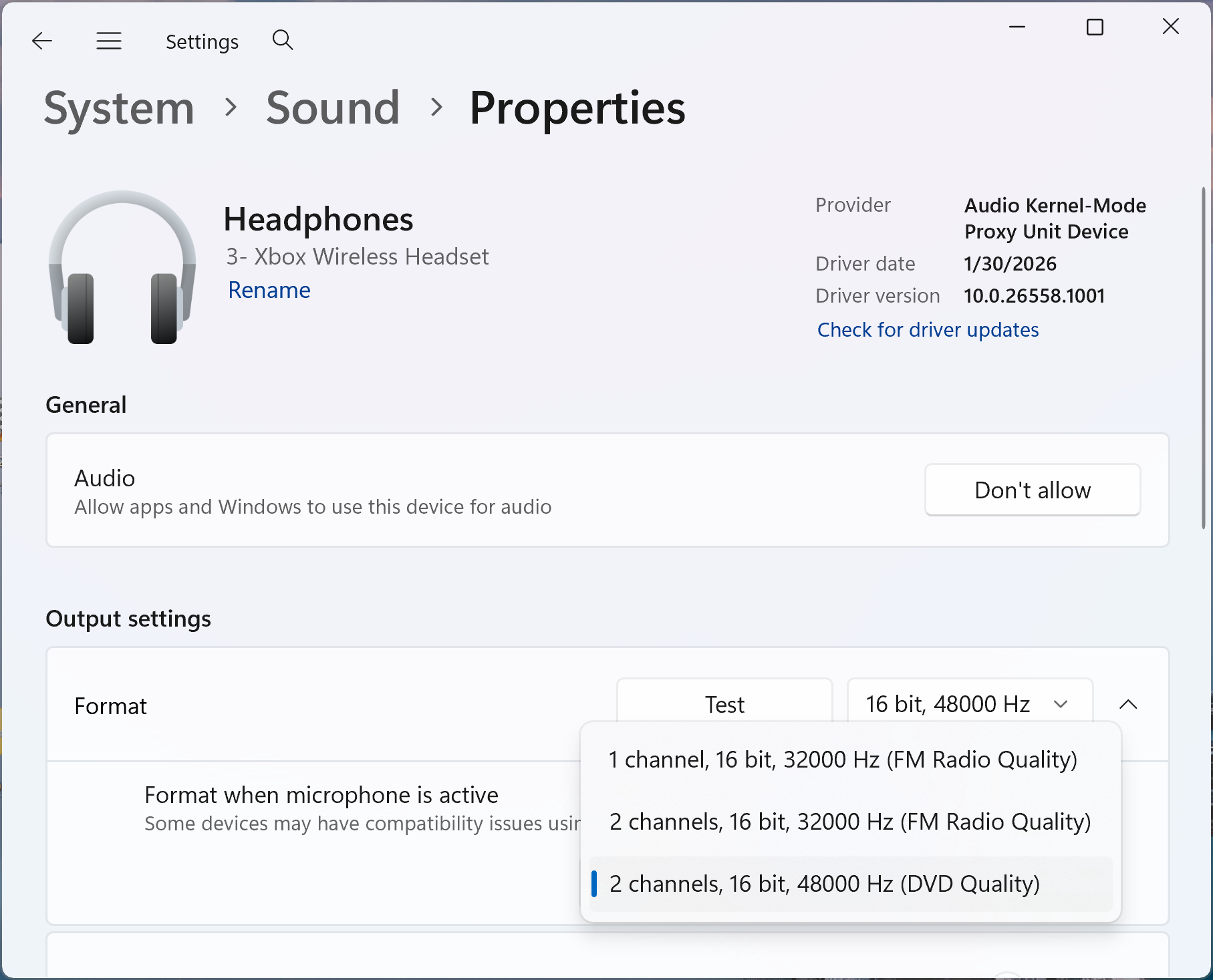
You put on a wireless headset, join a call, and suddenly everything you hear sounds flatter. Microsoft is testing an improvement for that situation in Windows 11 Experimental build 26340.10032. The November 20 release notes describe a setting that keeps full-range stereo playback at 48 kHz on compatible Bluetooth LE Audio hardware, even when that same device’s microphone is in use.
A change to what you hear
The setting is useful because you don’t always want to switch to a separate microphone just to make the rest of your audio sound better. Think about a game while a teammate is talking, or a song running in the background while you jump into a voice call. Microsoft also lists voice typing and Copilot Chat among the situations it has in mind.
This isn’t an upgrade every Bluetooth headset can use. Microsoft requires a PC that supports Super Wideband Stereo and an LE Audio accessory capable of 48 kHz playback. Seeing a recent Bluetooth version in a product listing isn’t enough to establish those two features. If you’re shopping for a headset mainly for this reason, check specifications for your particular combination of headset and PC instead of assuming the setting will appear.
Where the setting appears
On supported systems, open Settings, then System, Sound, and select your Bluetooth device under Output. In its output settings, look for Format when microphone is active, then select the option for two channels, 16-bit audio and 48000 Hz. That setting describes the audio you hear. It doesn’t promise that your outgoing microphone feed changes to 48 kHz stereo or that calls will sound better to people on the other end.
The key detail is the word Experimental. Microsoft says features are being rolled out gradually even inside that Insider channel. There is no confirmed stable-channel release date in the announcement. If you rely on your PC for work calls, I’d wait for the regular update rather than installing an Experimental build just for the audio setting.

Letters to the editor
0 commentsNo comments yet. Be the first to write in.