
News
Screens 5.10.6 turns a half-folded iPhone Duo into a pocket-sized remote laptop
Fold the iPhone Duo halfway and Screens puts your remotely connected computer on top with a virtual keyboard and trackpad underneath.
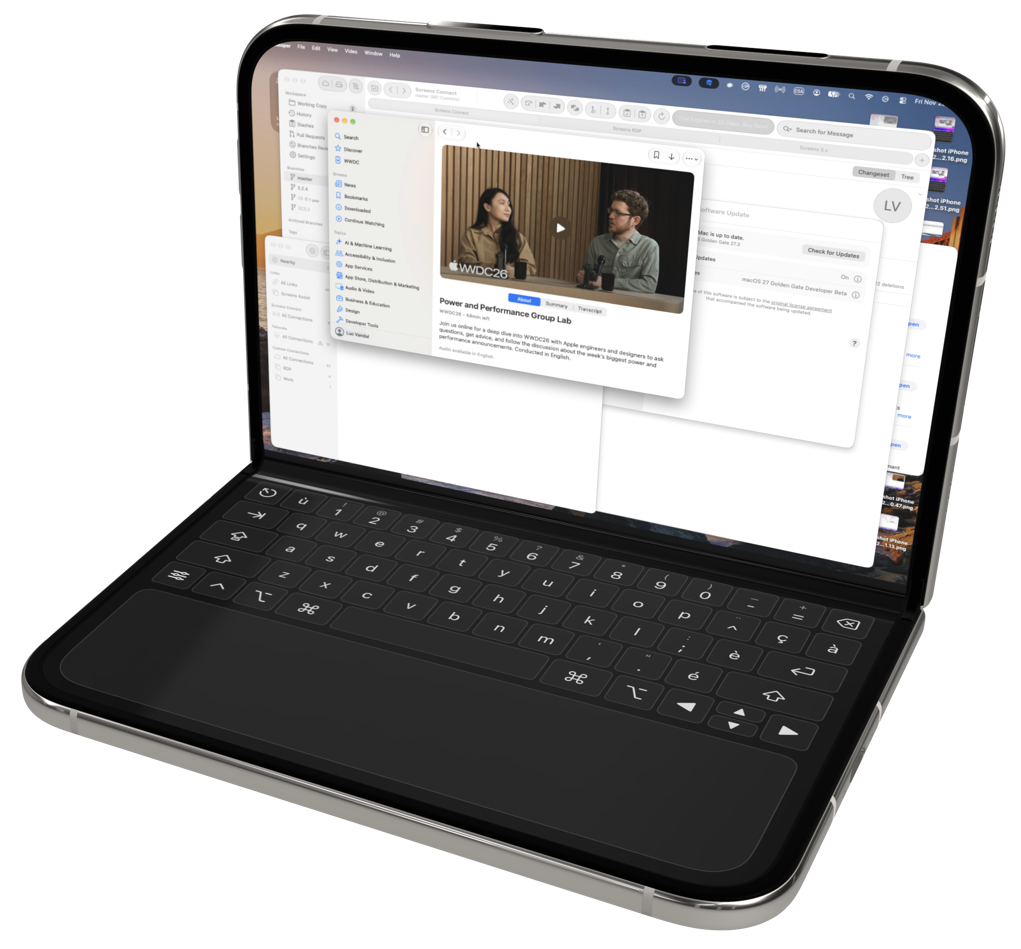
Edovia has added an interesting option for iPhone Duo owners who use the folding phone to access a computer remotely. The company announced Screens 5.10.6 on November 25, with a layout called Duo Laptop Mode that makes use of the phone's folding design. It does not turn iOS into a desktop operating system. Instead, Screens shows the remotely connected computer on one part of the folding display and a virtual input area on the other.
A small remote laptop
When the phone is half folded, the upper display becomes a screen for the connected computer while the lower portion provides a software keyboard and trackpad. The keyboard adapts to the selected iOS language, with secondary characters available through swipe gestures. The virtual trackpad supports multiple touches. It is a clever use of a foldable screen for activities where you need to make a quick edit or check something on a computer that you have permission to access.
Edovia says its High Performance Screen Sharing feature can provide responsive desktop resizing when connecting to a compatible Apple Silicon Mac running macOS 14 or later. A good connection to your own or authorized remote computer is still important, and the mobile screen will not offer the same working space as a full-sized laptop.
Other changes in Screens 5.10.6
The update adds two methods of dictation, one for typing text and another for pasting it, along with an optional Return action. There are portrait desktop resolution options, Apple Pencil keyboard actions for iPad and refinements to pointer handling. The November 25 release covered iOS, iPadOS and visionOS, with the Mac update pending at the time of the announcement.
Screens offers a seven-day trial and subscription or lifetime purchasing options, with Family Sharing support. Pricing and availability can vary by region. Official changelog | App Store.


Letters to the editor
0 commentsNo comments yet. Be the first to write in.