
Gadgets
Sanwa’s five-in-one USB-C hub accepts HDMI and DisplayPort in the same socket
The 400-HUBCP59BK has a combined HDMI/DisplayPort connector, USB ports up to 10Gbps and 100W charging input.
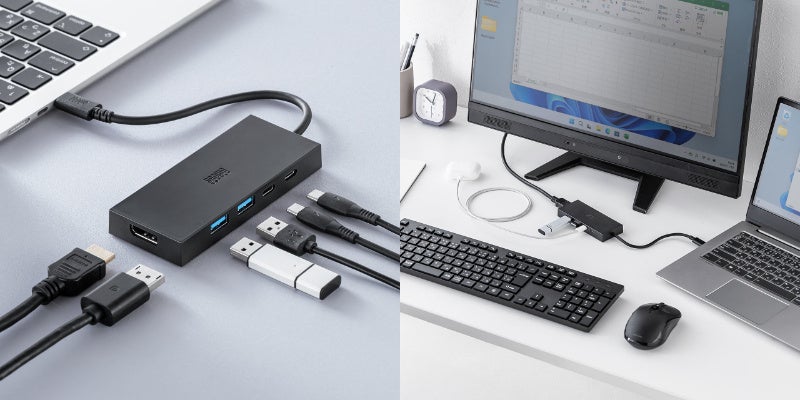
USB-C docks usually give you a standard HDMI output, a DisplayPort output, or both. Sanwa has taken a slightly different approach with its latest five-in-one hub, the 400-HUBCP59BK. The accessory, introduced on November 27 in Japan, features a single display socket designed to accept either an HDMI cable or a DisplayPort cable, rather than requiring separate connectors.
A useful display connector for compact desks
The hybrid output supports an external screen at up to 4K resolution and 60Hz with a compatible USB-C host. You can connect either HDMI or DisplayPort, but the single socket cannot drive both connections simultaneously. This makes sense for a small hub intended to expand a laptop with minimal clutter: a user can work with the display cable already available rather than having to carry two different display adapters.
Sanwa also includes two USB-A ports and one USB-C data port, all rated at up to 10Gbps theoretical transfer speed. This is useful for connecting a portable SSD, mouse, keyboard, or other peripherals. Actual speeds will depend on the connected equipment and how the hub is being used.
Charging and availability
The remaining USB-C connection accepts up to 100W of USB Power Delivery input, with about 90W available to pass through to the connected laptop. Some energy is reserved for the hub itself. The charger and cable must support the required power level; the presence of a USB-C port alone does not guarantee charging or display output compatibility.
The appeal is that a laptop user can attach a monitor, charging supply and desk accessories through one cable. This is especially useful if you move your laptop between a desk and a bag frequently. Sanwa lists the 400-HUBCP59BK in Japan at ¥4,164 before tax. Wider international availability and pricing have not been announced. Official product | Announcement.




Letters to the editor
0 commentsNo comments yet. Be the first to write in.