
News
Phosphor 2.0 Turns a Tiny ESP32 Screen Into a Retro Desk Gadget
Phosphor 2.0 brings four retro themes, internet radio, a focus timer and three games to Waveshare’s 3.49-inch ESP32 touchscreen.
This little desk screen has a radio, a weather page and an aquarium. And if you want a break, you can play a tiny lighthouse game on it. Phosphor 2.0 is a free firmware update for one specific Waveshare touchscreen, and it gives that small bar display enough personality to earn a spot next to a keyboard.
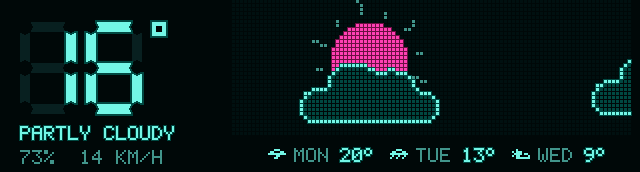
The developer’s November 22 release adds four visual styles. One takes its cues from vacuum fluorescent displays. The other three borrow the look of the Commodore 64, Amiga and Atari 2600. These are themes, not emulators. Each style changes the fonts, colours and page layouts, so even the same weather forecast gets a different look.
A little radio, a little arcade
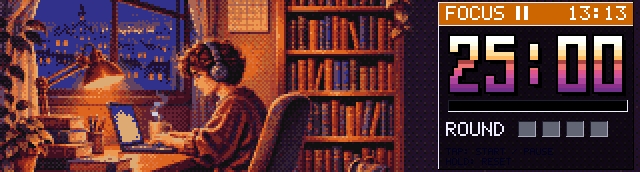
The developer’s project page shows the radio with dancers and an equalizer that move with the music. It supports MP3 and AAC streams, and you can add stations from a phone. There’s also a focus timer with a pixel-art study room, an alarm that can wake you with the radio, and little scenes you can leave running at your desk. Tap the fish tank to feed the fish, or tilt the board to move the sea beneath a pixel-art ocean liner.
The update adds three games. In Lighthouse Keeper, you swing a lamp across three lanes to guide ships away from the rocks. There’s also a runner where the top of the touchscreen makes your character jump and the bottom makes it duck. Everyday settings like brightness, your weather city and temperature units can now be changed on the board itself.
What you need to try it
Phosphor isn’t a finished gadget you can order. You’ll need the Waveshare ESP32-S3-Touch-LCD-3.49, a USB-C data cable and Chrome or Edge on a computer. The developer warns that the first install replaces what’s already on the board, including the factory demo, without backing it up. If you already own the board, it’s an unusually fun way to turn a spare screen into something you might actually leave on all day.



Letters to the editor
0 commentsNo comments yet. Be the first to write in.